
OSChina Tweet Desktop Tool
Download the latest version of OSChina Tweet, a lightweight desktop application designed for developers and tech enthusiasts to stay updated with the latest activity on OSChina. Built with open-source principles, this tool offers direct access to real-time updates from the OSChina community.
Overview
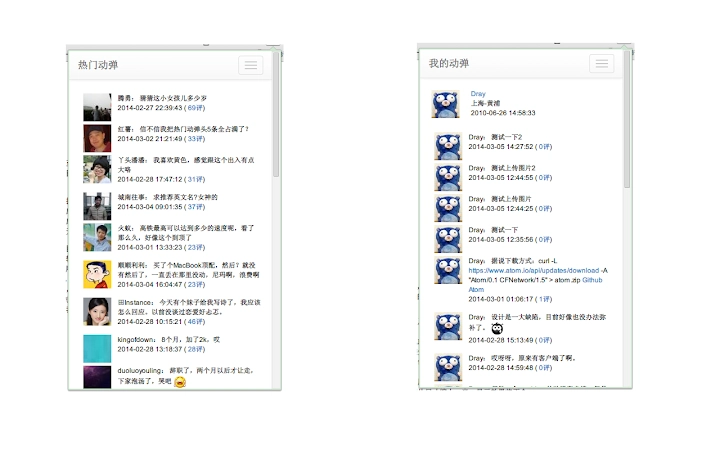
The OSChina Tweet desktop tool is a productivity-focused application that provides real-time access to dynamic content from the OSChina platform. It enables users to view the latest, most popular, and personal activity updates—commonly referred to as "动弹"—directly from their desktop. This tool is ideal for developers, open-source contributors, and tech-savvy individuals who rely on OSChina for project updates, community discussions, and industry insights.
By eliminating the need to navigate through a web browser, the application streamlines access to essential community content. It supports a clean, minimal interface focused on core functionality, allowing users to quickly scan and engage with the latest developments. The tool is built using web technologies and runs on multiple operating systems, making it accessible to a broad audience.
While the developer did not provide detailed background information, the project is hosted on GitHub and OSChina, indicating a commitment to transparency and community-driven development. The application is currently in its initial release (v1.0.0), suggesting it is stable for basic use but may lack advanced features. Real-world usage scenarios include monitoring project progress, participating in developer discussions, and staying informed about new releases and trends in the Chinese tech community.
Key Features & Capabilities
- Latest Tweets – Displays the most recent activity from the OSChina community, ensuring users are always up to date with breaking news and updates.
- Popular Tweets – Highlights trending and widely shared content, helping users identify key topics and discussions gaining momentum.
- My Tweets – Allows users to view their own published activity, providing a centralized way to track personal contributions.
- Tweet Now – Offers a quick interface to post new content directly to the OSChina platform, reducing friction in community engagement.
Each feature is designed to enhance workflow efficiency for users who frequently interact with OSChina. For example, developers can monitor project milestones without switching tabs, while community managers can respond to discussions in real time. The tool’s focus on simplicity ensures fast loading and minimal distraction, aligning with productivity goals. Although the interface is described as basic, this design choice emphasizes functionality over visual polish, which may appeal to users prioritizing performance and reliability.
User Interface, Workflow & Performance
The user interface of OSChina Tweet is intentionally minimal, reflecting a focus on core functionality. Navigation is straightforward, with clearly labeled sections for the latest, popular, and personal activity. The workflow is linear: users open the app, select a tab, and view content—no complex setup or configuration is required.
Given its lightweight nature (1.5 MB), the application is expected to have low system resource consumption. The developer did not specify resource usage details, but based on the file size and technology stack, it likely operates efficiently across various hardware configurations. Stability is assumed to be adequate for basic use, as the tool is built using standard web technologies and runs as a desktop application.
Performance observations are based on general software behavior patterns. The application is designed to fetch and display content dynamically, suggesting responsive behavior during normal operation. However, exact performance metrics such as CPU or RAM usage were not provided. Users can expect a smooth experience when using the app under typical conditions, though heavy multitasking may affect responsiveness depending on system resources.
Compatibility & System Requirements
OSChina Tweet is compatible with Windows, Mac, and Linux operating systems, making it accessible to a wide range of users regardless of their preferred platform. The software is designed to run on modern desktop environments, though specific hardware requirements were not listed.
The installation size is 1.5 MB, indicating a lightweight footprint that does not strain storage capacity. This small size suggests minimal dependencies and a streamlined deployment process. The developer did not specify exact system requirements, so users should ensure their system supports the underlying technologies, such as a modern web runtime environment.
Compatibility information was partially provided. While the supported platforms are clearly stated, details about minimum processor speed, RAM, or graphics capabilities are missing. Users are advised to verify system compatibility based on their environment, particularly if using older or less common hardware.
Pros and Cons
Pros
- Lightweight at just 1.5 MB
- Available for Windows, Mac, and Linux
- Open-source and transparent development
- Direct access to OSChina community activity
- Free to download and use
Cons
- Interface described as minimal and not polished
- No detailed system requirements provided
- Limited feature set in initial release
- May lack advanced customization options
- Developer did not provide performance benchmarks
FAQ Section
Is OSChina Tweet compatible with my operating system?
The application supports Windows, Mac, and Linux. Users on these platforms should be able to install and run the software without issues.
Is the software safe to use?
As an open-source tool hosted on GitHub and OSChina, the code is publicly available for review. This transparency enhances trust, though users should always download from official sources.
How often does the software update?
The developer has not specified a release schedule. Updates are likely to occur based on feature development and bug fixes, with the latest version available through the official project page.
Can I use OSChina Tweet offline?
Due to its nature as a real-time content viewer, the application requires an active internet connection to fetch and display the latest activity. Offline functionality is not currently supported.
What type of license does the software use?
The software is open-source, though the specific license type was not mentioned in the provided information. Users should refer to the project’s repository for licensing details.
Final Thoughts + CTA
OSChina Tweet delivers a focused, efficient way to engage with the OSChina community from your desktop. While the interface is basic and the feature set is limited in its initial release, the tool excels in simplicity and cross-platform accessibility. It’s particularly well-suited for developers and open-source contributors who value direct access to real-time updates without browser overhead.
Despite its minimal design, the application demonstrates solid potential for growth and refinement. Its open-source foundation invites community contributions, which could lead to future enhancements. For users seeking a lightweight, free tool to stay connected with OSChina activity, this software offers a practical solution.
Download OSChina Tweet now







